Run YOLOv8 on the Blade 3 NPU
This guide builds the YOLOv8 example from Rockchip's rknn_model_zoo on Blade 3 and runs object detection on a sample image with the NPU. Everything is done on the board itself.
Before you start
- Blade 3 is running Mixtile OS (see Flashing an OS Image) and is connected to the internet.
- You are logged in on the board, on its desktop, over SSH or on the serial console.
Mixtile OS already includes the RKNN runtime (librknnrt) that runs models on the NPU, so you do not need to install it.
Step 1. Install the build tools
sudo apt update
sudo apt install -y build-essential cmake git
Step 2. Download the example and the model
-
Clone rknn_model_zoo into your home directory:
Blade 3cd ~git clone https://github.com/airockchip/rknn_model_zoo -
Download the
yolov8n.rknnmodel into the example'smodeldirectory:Blade 3cd ~/rknn_model_zoo/examples/yolov8/modelwget https://downloads.mixtile.com/doc-files/yolov8/rk3588/yolov8n.rknnThis model is
yolov8n.onnxconverted for the RK3588 NPU. To convert a model yourself, see Convert to RKNN.
Step 3. Build the example
cd ~/rknn_model_zoo
CFLAGS="-Wno-error=incompatible-pointer-types -Wno-error=implicit-function-declaration" \
bash build-linux.sh -t rk3588 -a aarch64 -d yolov8
The CFLAGS are needed because the GCC version in Mixtile OS treats two old patterns in the example's code as errors. They turn those errors back into warnings.
Expected result: the build ends with Built target rknn_yolov8_demo, and the example is installed to ~/rknn_model_zoo/install/rk3588_linux_aarch64/rknn_yolov8_demo/:
rknn_yolov8_demo
├── lib
├── model
│   ├── bus.jpg
│   ├── coco_80_labels_list.txt
│   └── yolov8n.rknn
├── rknn_yolov8_demo
└── rknn_yolov8_demo_zero_copy
Step 4. Run object detection
The example takes a model and an input image:
cd ~/rknn_model_zoo/install/rk3588_linux_aarch64/rknn_yolov8_demo
./rknn_yolov8_demo model/yolov8n.rknn model/bus.jpg
The input image is model/bus.jpg:

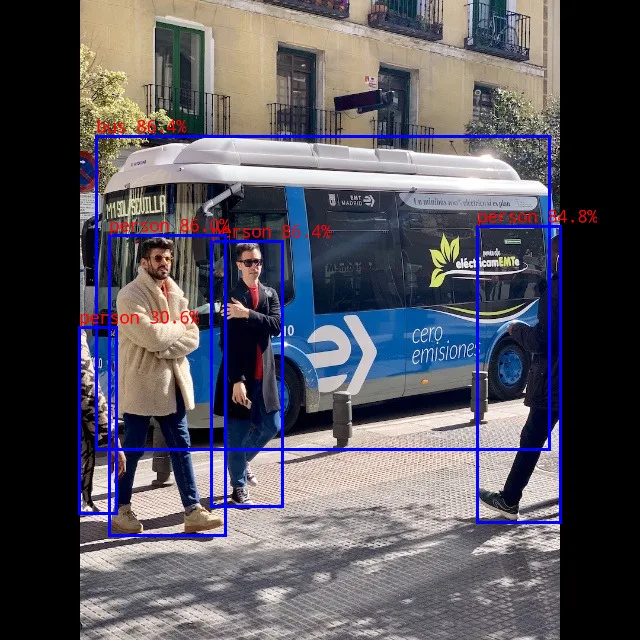
Expected result: the output lists each detected object with its label, box coordinates and confidence score:
person @ (211 241 282 506) 0.864
bus @ (96 136 549 449) 0.864
person @ (109 235 225 535) 0.860
person @ (477 226 560 522) 0.848
person @ (79 327 116 513) 0.306
The same detections are drawn on the image and saved as out.png in the current directory:
Troubleshooting
| Problem | What to do |
|---|---|
The build stops with error: implicit declaration of function 'cos' or error: initialization of 'char *' from incompatible pointer type | Run the build command in step 3 with the CFLAGS shown there. |
| You are not sure which RKNN runtime the example uses | Run ldd rknn_yolov8_demo | grep rknnrt in the example directory. On Mixtile OS it shows /usr/lib/aarch64-linux-gnu/librknnrt.so. |