Quick Start
This page takes you from an unpacked Edge 2 to a board that has started up.
Packing list
A standard Edge 2 package includes:
- 1 x Edge 2 board
- 1 x USB-C to USB-C cable, 1 m
If you have the Edge 2 Kit, with the board in an enclosure and two Wi-Fi antennas, see Edge 2 Kit Enclosure for its ports and antennas.
What you need
To start Edge 2 you also need:
- A power supply. Either a USB PD adapter that supports PD 2.0 or PD 3.0, used with the included USB-C to USB-C cable, or a 12 V DC adapter. See Power Supply.
- An HDMI monitor and an HDMI cable.
- A USB keyboard and mouse.
- An Ethernet cable to your router, to reach the internet and to log in over SSH.
Not needed for a first start, but useful later:
- A USB to TTL serial adapter, to reach the serial console when there is no monitor
- Two Wi-Fi antennas for the antenna connectors on the bottom side of the board, to use Wi-Fi and Bluetooth
With the server edition of Mixtile OS, you can leave out the monitor, the keyboard and the mouse. Connect only the Ethernet cable and the power supply, then log in over SSH as described in Connect to Edge 2.
Installing the operating system
Edge 2 starts the system on its eMMC. To run Mixtile OS, install it first by following Flashing an OS Image, then come back here to connect and power on the board.
Flashing needs two items that are not in the list above: a 12 V DC adapter, and a USB-A to USB-C data cable to connect the board to the computer.
Wiring and powering up
The ports you need are along the edges of the board. Place the board on a non-conductive surface, connect everything else first, and the power supply last.
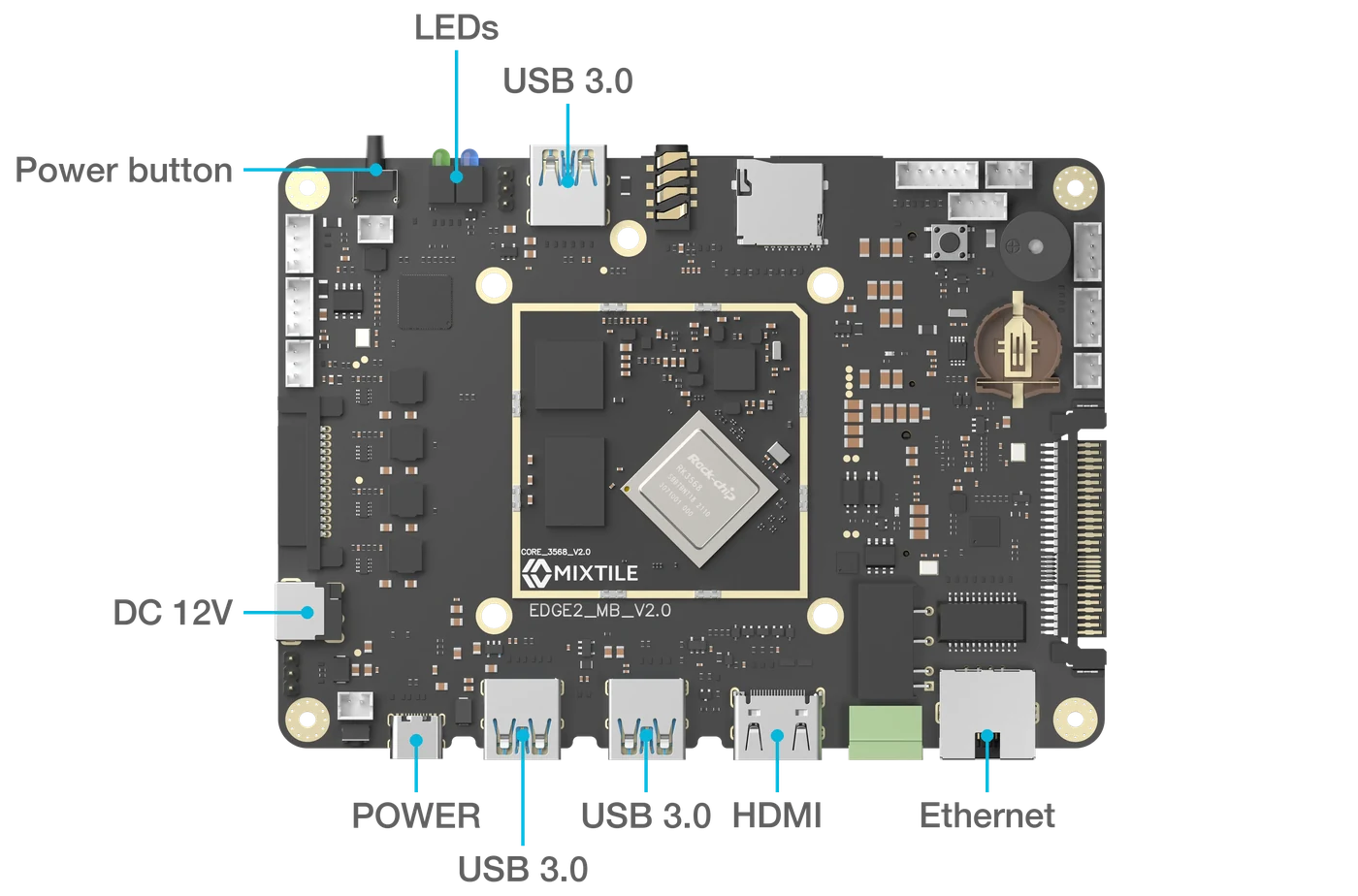
Figure 1. The ports used for a first start
- Connect the monitor to HDMI.
- Connect the keyboard and mouse to any of the three USB 3.0 ports.
- Connect the Ethernet cable to the Ethernet port, and the other end to your router.
- Connect the power supply, one of:
- USB PD adapter: to POWER, the USB-C port at the corner of the board.
- 12 V DC adapter: to DC 12V, the round jack on the short edge.
Edge 2 starts as soon as power is connected.
After power-up
The green power LED lights up when the board is powered. Once Mixtile OS is running, the blue system LED blinks in a heartbeat pattern. The two LEDs are next to the power button, on the edge opposite the HDMI port.
- Desktop edition: the GNOME desktop appears on the monitor, already logged in as
mixtile. - Server edition: a
mixtile-edge2 login:prompt appears on the monitor. Log in asmixtilewith the passwordmixtile. See Login details.
To check that the system is running and on the network, open a terminal and run:
ip -brief address
The Ethernet interface shows UP and an IPv4 address from your router. Use that address to log in over SSH.
If the monitor stays blank, check that the green LED is on. If it is off, see Power Supply.
To turn the board off, shut down the system, for example with sudo poweroff. To start it again, press the power button, or disconnect and reconnect the power supply.