UART
Edge 2 has two general-purpose UART connectors, UART3 and UART5, for serial devices such as sensors, GPS receivers and microcontrollers. Both are four-pin, 2.0 mm connectors on the top side of the board: UART3 next to the MASKROM button, and UART5 on the edge beside the coin-cell holder.
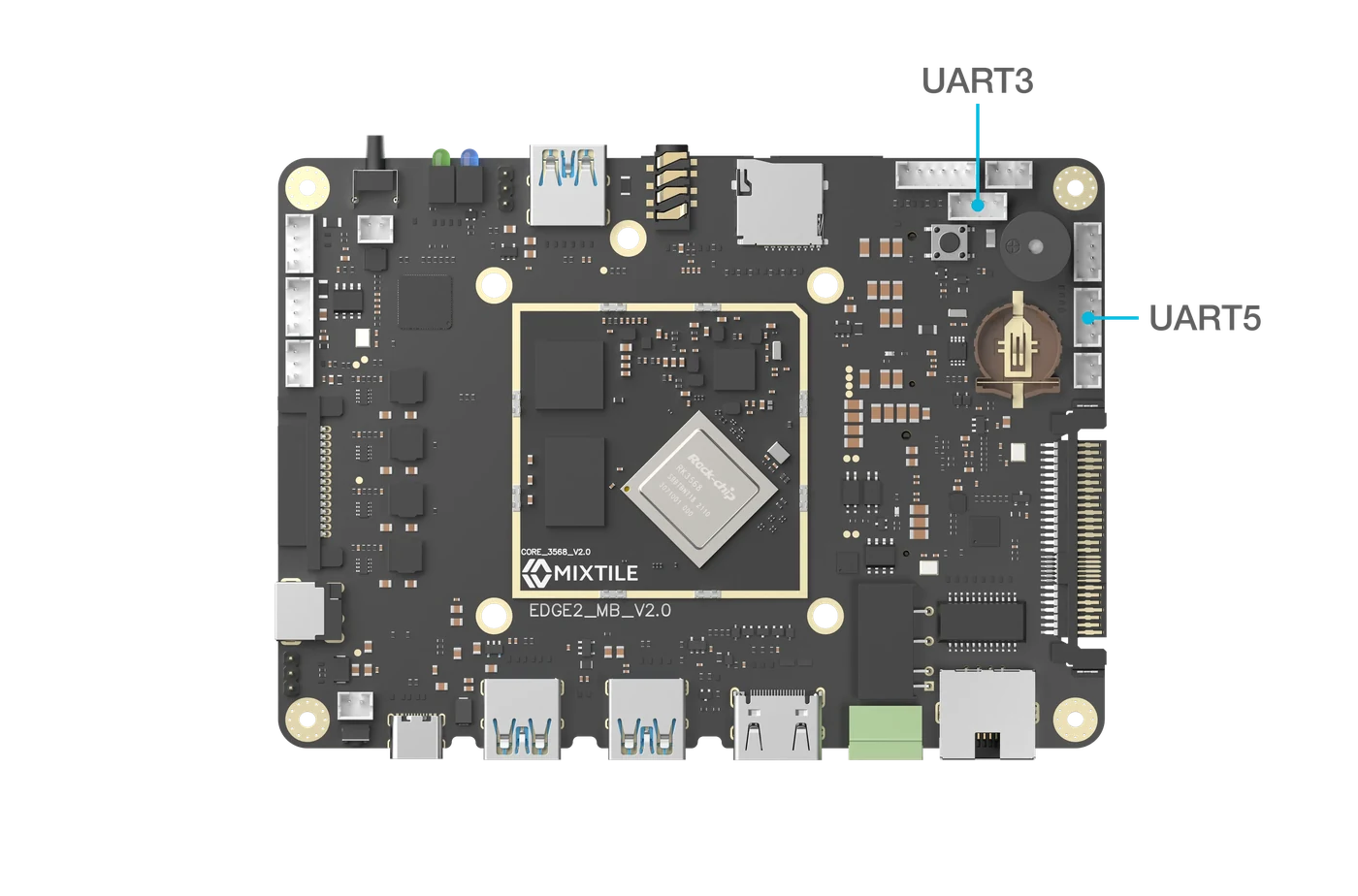
Figure 1. The UART3 and UART5 connectors
Specifications
- 3.3 V logic. Do not connect 5 V logic directly.
- 3.3 V supply output on pin 1, up to 100 mA
Pin Assignments
Both connectors use the same layout.
| Pin# | PinName | PinType | Input/Output | Signal Description |
|---|---|---|---|---|
| 1 | 3.3V | Power | Output | 3.3 V supply, 100 mA maximum |
| 2 | UART3_RX / UART5_RX | signal | Input | Receive data |
| 3 | UART3_TX / UART5_TX | signal | Output | Transmit data |
| 4 | GND | Power | NA | Power and signal reference ground |
Wiring
Connect the device's GND to pin 4, its TX to RX (pin 2), and its RX to TX (pin 3). If the device has its own power supply, leave pin 1 unconnected.

Figure 2. Wiring a USB to TTL converter to UART3 or UART5
Test the UART with Mixtile OS
This test sends text between Edge 2 and a computer through a USB to TTL converter wired as in Figure 2. In Mixtile OS, UART3 is /dev/ttyS3 and UART5 is /dev/ttyS5. The examples use UART5.
-
On the computer, open the converter's serial port at 115200 baud, for example with picocom as in Connect to Edge 2:
Host PCpicocom -b 115200 /dev/ttyUSB0 -
On Edge 2, set the same speed and send a line:
Edge 2stty -F /dev/ttyS5 115200 raw -echoecho "hello from Edge 2" > /dev/ttyS5Expected result:
hello from Edge 2appears in picocom. -
To receive, run the following on Edge 2 and type in picocom:
Edge 2cat /dev/ttyS5Expected result: what you type appears on Edge 2. Press Ctrl+C to stop.
This procedure has not yet been verified on Edge 2 hardware with Mixtile OS.